
The community site for and by
developmental and stem cell biologists

Science and society

Posted by , on 23 September 2026

Did you know that Development publishes ‘Perspective’ articles that cover the intersection of developmental biology and stem cell research with society, including some useful resources for science communication with the public and discussions of research ethics? Some of the recent articles include:

Speaking science in a fractured world: making truth land when facts alone cannot
by Rebecca Calisi-Rodríguez, Kevin Alicea-Torres, Jamy Peng, Nicole Theodosiou and Crystal Rogers

How can scientists communicate more effectively in an era of misinformation? This Perspective draws on insights from ‘Truth Matters: Strengthening Science Communication to Counter Misinformation’, a scenario-based workshop delivered at the 20th International Congress of Developmental Biology in Puerto Rico in June 2025. The authors share practical strategies for culturally responsive and emotionally attuned communication, alongside a broader message: for science to inform society, it must be communicated in ways that people understand, trust, and find relevant to their lives.

Frozen potential: embryo research at the crossroads of ethics, regulation and scientific opportunity 
by Mina Popovic, Catello Scarica, Susana Chuva de Sousa Lopes and Marta Shahbazi

Why does improving medically assisted reproduction remain such a pressing clinical challenge? This Perspective explores the inherent inefficiencies of human reproduction and makes the case for a more nuanced global conversation on embryo research. Rather than framing the debate as a choice between permissiveness and prohibition, the authors advocate for governance frameworks that enable ethical, transparent, and responsible scientific progress.
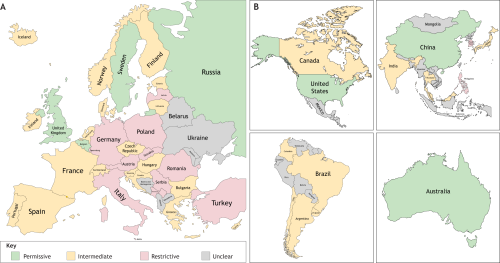
Figure 1 from the article. Regulatory landscape of human embryo research across Europe. Countries are classified based on national policies regarding the research use of human embryos and the derivation of human embryonic stem cells (hESCs). Permissive (green): countries that allow the creation of embryos specifically for research purposes, in addition to permitting research on supernumerary embryos and hESC derivation. These countries typically have comprehensive legislation, require explicit informed consent and involve multi-level ethical oversight. Intermediate (yellow): countries that permit research on supernumerary embryos and may allow hESC derivation, but prohibit the creation of embryos solely for research. Regulatory conditions vary, and implementation may be more restrictive in practice. Restrictive (pink): countries that prohibit embryo research entirely or allow it only in very limited forms (e.g. observational studies without embryo destruction). Creation of embryos for research and hESC derivation is prohibited.
Figure 1 from Frozen potential: embryo research at the crossroads of ethics, regulation and scientific opportunity

From bench to business: translating academic advances into industry innovations
by Oscar J. Abilez, Alok Javali, Jacob Jones, Rubén Rellán-Álvarez, Rosangela Sozzani and Eldad Tzahor

What does it take to turn scientific discovery into commercial success? In this Perspective, six researchers reflect on their transition from academia to industry, sharing their experiences helping to build four bioscience companies. From navigating patents and intellectual property to working with investors and biotech start-ups, they offer insights into the challenges and opportunities involved in translating discoveries from the laboratory to the marketplace.

Adventures in involving and engaging the public in human developmental biology research
by Naomi Clements-Brod and Emma Rawlins

What can researchers learn from experimental approaches to public engagement? In this Perspective, the authors reflect on the successes and setbacks of a unique initiative designed to connect the public with fundamental research through the Human Developmental Biology Initiative. Their experiences offer practical insights for others looking to build meaningful public involvement into their own work.

Past and future of human developmental biology
by Nick Hopwood

How has the study of human development changed over time and what challenges does it face going forward? In this Perspective, science historian Nick Hopwood explores whether research on human development will be facilitated or frustrated.

Human developmental biology – a global perspective
by Amander Clark, Mubeen Goolam, Jacob Hanna, Katie Long, Dianne Nicol, Sophie Petropoulos, Mitinori Saitou, Patrick Tam and Hongmei Wang

How is human developmental biology perceived around the world? This Perspective brings together researchers from eight countries to reflect on the factors shaping human developmental biology. Responding to Nick Hopwood’s view that the field has experienced cycles of attention and neglect, they discuss how local legal, political, societal, regulatory and technological contexts are influencing its future direction.
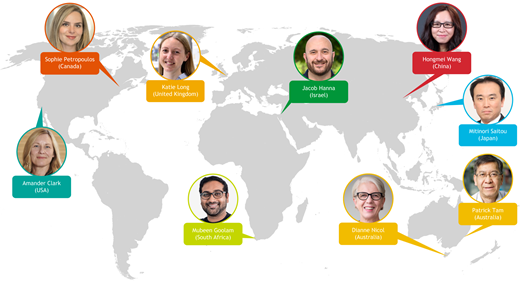
Image showing the location of the authors for the article 'Human developmental biology – a global perspective'.
Figure from Human developmental biology – a global perspective

The art of observation: bridging science and art to see the unexpected
by Lauren Gonzalez, Haoyang Wei, Valentina Greco and Linda Friedlaender

What can scientists learn from artists? In this Perspective, the authors show how art-based training can strengthen observational skills, revealing insights that might otherwise be missed in scientific data. They share practical lessons on collaborative observation, interpretation, and creativity, offering a framework that other research groups can adapt to enhance their own scientific practice.


(No Ratings Yet)

Tags: , , , ,
Categories: Education, News, Outreach, Resources

Navigate the archive

Use our Advanced Search tool to search and filter posts by date, category, tags and authors.

SciArt Profile: Wen Lu

Posted by , on 11 September 2026

In this SciArt profile, we meet Wen Lu, a Research Assistant Professor in the Department of Cell and Developmental Biology at Northwestern University Feinberg School of Medicine. The eight pieces shown in this profile show how Wen uses different visual styles and tools to highlight the beauty of biology, communicate scientific concepts, and promote research and scientific events.

Can you tell us about your background and what you work on now?

My name is Wen Lu, and I am a Research Assistant Professor in the Department of Cell and Developmental Biology at Northwestern University Feinberg School of Medicine. I received my bachelor’s degree in Biological Sciences from Peking University and my PhD in Genetics from the University of Chicago.

My research focuses on how the cytoskeleton is organized and regulated by molecular motors in neurons and oocytes, which are among the longest and largest cells in animals, respectively. I use Drosophila melanogaster, commonly known as the fruit fly, as a model organism, and combine genetics, optogenetics, pharmacological perturbations, and high-resolution microscopy to address these questions.

Outside the lab, I also work as a freelance designer, helping with logo design, graphic illustration, and other visual communication projects.

#1. A Garden of Fruit Fly Ovaries
At the center are healthy wild-type Drosophila ovaries, surrounded by much smaller msps mutant ovaries.
(This piece won 2nd place in the Published category of the 2024 Microscopy Today Micrograph Award, and 1st place in Category 2 of the 2024 Proteintech Microscopy Image Competition.)

Were you always going to be a scientist?

From a very young age, I was curious, good with my hands, and always trying to solve puzzles. I enjoyed finding my own way to approach different problems, which I now realize are useful qualities for a scientist.

Besides dreaming of becoming a scientist, I also dreamed of becoming a farmer. In a funny way, raising hundreds of thousands of fruit flies in the lab has fulfilled that childhood dream too. I suppose I did become a farmer after all — a Drosophila farmer.

#2. When a Molecular Motor Turns the Brain Upside Down
This microscopy-based artwork compares two third instar larval Drosophila brains: a wild-type brain on the left and a kinesin-5 mutant brain on the right, shown upside down to emphasize the visual contrast between the two samples.
(This piece was featured as the cover image of Development, Volume 152, Issue 9, May 2025, and was named 1st Runner-Up in the Still Image category of the 2026 Drosophila Image Award.)

And what about art – have you always enjoyed it?

I would call myself a microscopy enthusiast, which means that anything beautiful captured through a microscope can make me excited. I also enjoy arranging and montaging microscopy images into visually appealing pieces that highlight the beauty of biology.

Beyond microscopy, I am also interested in graphic design. I enjoy creating logos, flyers, scientific illustrations, and other visual materials, especially when they help promote scientific research and make science more engaging and accessible to a broader audience.

#3. The Molecular Workhorse
The 3D rendering artwork highlights both the complexity and elegance of the cytoplasmic dynein motor inside living systems.

What or who are your most important artistic influences?

My artistic influences come from a somewhat unusual mix of styles. I have always been drawn to the elegance, simplicity, and expressive lines of traditional Chinese painting, as well as the softness and fluidity of watercolor. At the same time, I also love the bold colors, playful energy, and visual storytelling of pop art and animation.

It may sound like an odd combination, but I think that contrast often leads to interesting artwork. In my SciArt pieces, I enjoy bringing these influences together to make biological subjects feel both beautiful and approachable.

#4. Choosing the Oocyte
This 3D-rendered artwork highlights the highly conserved TOG domains of Msps/XMAP215, a microtubule regulator that helps determine which of two sister cells becomes the oocyte in the developing Drosophila ovary.

How do you make your art?

I mainly use Adobe Illustrator for 2D artwork and Blender for 3D artwork. For videos and animations, I use Filmora for editing and assembling the final pieces.

Most of these tools are self-taught. I learned them gradually through YouTube tutorials, online resources, and a lot of trial and error. Often, I start with a scientific idea, microscopy image, or biological structure, and then explore how to translate it into a visual form that feels clear, engaging, and aesthetically pleasing. Depending on the project, the final piece may be a clean vector illustration, a 3D-rendered scene, a microscopy montage, or a short video designed for science communication.

#5. An Odyssey of Wonder
A cartoon illustration created to promote Drosophila research through a playful, pop-art-inspired visual style. It reimagines the fruit fly as a tiny explorer on a colorful journey.
(This piece was the winner of the 2025 Genesee Scientific Art Contest.)

Does your science influence your art at all, or vice versa, or are they separate worlds?

For me, science and art are deeply connected, but the art often serves as a way to communicate and promote the science. Many of my artistic ideas start from my research, especially microscopy images, cellular structures, or biological concepts that I find visually beautiful or scientifically exciting.

I see art as a bridge between scientific discovery and broader audiences. A microscopy image may be meaningful to scientists because of the data behind it, but with thoughtful visual presentation, it can also capture the curiosity of people outside the field. In that sense, my art helps me share not only what I study, but also why I find biology so fascinating.

At the same time, making art has also influenced how I think about science. It trains me to look more carefully, pay attention to visual patterns, and think about clarity, composition, and storytelling. So while my art is often created in service of science communication, the creative process also feeds back into how I observe and present my scientific work.

#6. Fruit Fly Ninja — The Sweetest Slash
A bold, energetic cartoon illustration that turns a fruit fly into a playful “ninja” slicing through fruit

What are you thinking of working on next?

I would like to continue creating microscopy-based artwork that reveals the beauty of biology, while also becoming more involved in the SciArt community and using visual art to promote Drosophila research. Fruit flies are such a powerful model system, but they are not always perceived as visually appealing by the broader public. I hope my work can help change that by showing how beautiful, elegant, and scientifically valuable they are.

More specifically, I am currently working on a piece featuring two Drosophila brains. The microscopy images themselves are already visually stunning, so my goal is to build on that natural beauty and transform them into an artwork that feels even more striking and emotionally engaging. Looking ahead, I would also love to create more pieces that combine microscopy, illustration, animation, and storytelling to make developmental biology more accessible to a broader audience.

#7. CDB: Biology in the City
A departmental logo design that combines the Chicago skyline with biological imagery. The CDB letters incorporate model organisms and cellular structures, reflecting the diversity of research within the department.
(This piece won the CDB Graphic Design Contest and is now used as the department’s graphic symbol.)                      

How/ where can people find more about you?

People can find more about my previous work on my portfolio website:
https://wlu7da7.myportfolio.com/

I also regularly share new microscopy images, SciArt pieces, research updates, and announcements about scientific events on LinkedIn:
https://www.linkedin.com/in/wenlu2023/

#8. Seeing Science
A logo created for a science education channel. Inspired by both an eye iris and a camera shutter, the design uses a bold circular center and radiating organic lines to suggest vision, curiosity, observation, and image capture.

(2 votes)

Tags: , ,
Categories: Science Art

Call for papers – Human Development

Posted by , on 7 September 2026

Development, host of the Node, invites you to submit your latest research to our upcoming Special Issue – Human Development. This issue will be coordinated by Guest Editor Hongmei Wang 王红梅 (State Key Laboratory of Organ Regeneration and Reconstruction, Institute of Zoology, Chinese Academy of Sciences, China) alongside our team of research-active Editors.

As a journal, Development has a long history of supporting the field of human developmental biology. Since launching a series of dedicated meetings – the first of their kind – Development has published two special issues dedicated to human development, the first in 2015 and the second in 2018. Nearly a decade later, we’ve witnessed a revolutionary change in techniques and conceptual approaches for studying human development. Organoid systems have advanced significantly, with sophisticated multi-lineage and assembloid systems that better recapitulate organogenesis and enable the study of complex cell interactions. Similarly, stem cell-based embryo models grant unprecedented access to the earliest stages of human embryogenesis. This latest special issue, announced in conjunction with the Human Development: Stem Cells, Models, Embryos meeting co-organised by Development and the Human Developmental Biology Initiative, aims to build on that legacy and capture these exciting advances in our understanding of how our species develops. We value studies that cover developmental and regenerative principles at any scale, from genetic regulation to signalling and tissue–tissue interactions and across the human lifespan, from fertilisation, implantation and gastrulation, to organogenesis and postnatal processes such as nervous system refinement, puberty, pregnancy and the maintenance and regeneration of adult tissues by resident stem cells. We welcome comparative studies using non-human systems that improve our understanding of human evolution and developmental disease. We seek to showcase research spanning the full breadth of available experimental systems, including primary tissue, human stem cells and their derived 2D and 3D models, alongside emerging approaches in bioengineering and computational biology that seek to develop new or improved in vitro systems with which to uncover principles and mechanisms of human development and regeneration.

The deadline for submitting research papers is 1 March 2027.

(No Ratings Yet)

Tags: , , , , ,
Categories: News

Migrating from Conda to Pixi: A cleaner and faster package manager

Posted by , on 4 September 2026

If you have been working with data science tools, Python, and R for a while, you know the struggle of working with multiple dependencies for each library/package. I recently found myself staring at a massive, cluttered work/ directory full of Nextflow environments. It felt like my system was groaning under the weight of gigabytes of stale dependencies. That is the exact moment I decided to completely get rid of Conda from the system and switch to Pixi.


Pixi is a modern, blazing-fast package manager built in Rust.
Instead of managing global environments that inevitably bleed into one another, Pixi manages dependencies purely on a per-project basis.
Before you take the plunge, here is a breakdown of what makes Pixi great, where it falls short, and exactly how to migrate your existing Conda setups.

Pixi vs. Conda: The Pros and Cons

The Pros of Pixi
True Project Isolation: Pixi stores your environment in a hidden .pixi folder directly inside your project directory. This means no more global environment pollution, and deleting a project safely deletes its environment, meaning no leftover cache eating up your hard drive.
Lightning Fast: Because it uses the rattler engine (built in Rust), resolving dependencies and downloading packages is significantly faster than standard Conda.
Built-in Reproducibility: Pixi automatically generates a pixi.lock file every time you change a dependency. If you share your repository with a colleague, they are guaranteed to get the exact same package versions, down to the system libraries.

The Cons of Pixi
No “Base” Environment: If you are used to just opening a terminal and typing python using your base Conda environment, you will have to adjust. Pixi requires you to be inside a project or use global installs cautiously.
Not a big problem though, just some behavioural change required
Disk Space Duplication: Because environments are local to the project, if you have ten projects using the same massive libraries (like PyTorch or Seurat), you will use more disk space unless you configure global package caching effectively.
Easy to overcome this using global packages
The Learning Curve: You have to learn a new pixi.toml configuration syntax, and managing specific channel priorities (like conda-forge vs. bioconda) requires explicit setup rather than relying on a global .condarc file.
Again can be learnt very easily. In fact, most of the times, you’ll not even need to open the pixi.toml file.

Starting from Scratch: Installing Pixi and Initializing a Fresh Project

If you do not have a Conda environment to export, or if you simply want to start with a completely clean slate, getting Pixi up and running takes less than a minute. First, you need to install Pixi system-wide. Open your terminal and run the official standalone installation script. This will download the Pixi binary and automatically add it to your system’s PATH.
Refer to this for more details from the official developers: https://pixi.prefix.dev/latest/installation/
curl -fsSL https://pixi.sh/install.sh | bash

Once the installation finishes, either restart your terminal or refresh your shell configuration (for example, by running source ~/.bashrc or source ~/.zshrc) so your system recognizes the pixi command.
Next, let’s create a brand-new project without relying on any old YAML files. Navigate to your desired workspace directory and initialize the project from scratch:
# Initialize a new Pixi project
pixi init my_fresh_project
# Move into the new directory
cd my_fresh_project
Unlike Conda, which builds a heavy environment immediately, this initialization command simply generates a lightweight pixi.toml configuration file. The actual .pixi environment folder is not created until you add your first package. To kickstart your data science setup, you can declare your core languages and libraries directly from the command line:
# For a Python-based project:
pixi add python jupyter pandas
# Or for an R-based project:
pixi add r-base r-irkernel r-ggplot2
As soon as you run the add command, Pixi reaches out to the repositories, resolves the dependencies using the lightning-fast rattler engine, locks the specific versions in a pixi.lock file, and builds your isolated environment on the fly. From there, you simply type pixi shell to activate the environment, and you are ready to start coding—no messy base environments required.

Migrating from an existing Conda environment

Step 1: Exporting Your Conda Environment and Initializing Pixi
If you have a working Conda environment, you can export it and use it to seed your new Pixi project.
First, export your existing environment to a YAML file:
# Activate your old conda environment
conda activate my_old_env
# Export it to an environment.yml file
conda env export > environment.yml
# For clean environment.yml export use this:
conda env export --from-history > environment.yml
# this ensures only explicitly installed libraries are listed unlike the system packages which can cause conflict
Now, let’s create a brand new Pixi project using that file:
# Initialize a new Pixi project by importing the yaml file
pixi init --import environment.yml my_new_project
# Move into your new project directory
cd my_new_project
This command automatically translates your Conda dependencies into a pixi.toml file and creates the isolated .pixi environment directory.

Step 2: Testing, Adding, and Removing Packages
To interact with your new environment, you need to enter the Pixi shell (which replaces conda activate).
# Activate the local project environment once inside the my_new_project directory
pixi shell
# Verify that Python or R is running from the local .pixi path
which python which R
# the paths should be inside .pixi/...
Managing packages is incredibly straightforward. It updates your pixi.toml and lockfile automatically.
# Add a new package from conda-forge
pixi add pandas
# or use the shorthand:
pixi a pandas
# Remove a package you no longer need
pixi remove pandas

Connecting to a tmux kernel

One of the best workflows for heavy data processing is starting your Jupyter server or R session inside a tmux session, so it survives network disconnects.

  1. SSH into your server, start tmux new -s project-name, and navigate to your project.
  2. Run your kernel (e.g., pixi run jupyter notebook --no-browser or simply start an R script). Copy the link with hash (localhost).
  3. In VS Code, open your notebook (script.ipynb).
  4. Click the Kernel Selection button in the top right.
  5. Instead of picking a default environment, look for the Existing Jupyter Server and add the link that you copied at step 2.
  6. From next time onwards, choose the specific active kernel (it will often be labeled kernel(script.ipynb) or match your project name like pixi_r_proj1).

By selecting the kernel tied to your tmux session, you can open multiple scripts in VS Code and connect them all to the exact same memory block. You define a variable in script A, and you can instantly read it in script B, all safely contained within your isolated Pixi environment.

Migration takes a bit of cleanup, but once you experience the speed and cleanliness of a purely project-based environment, you will never look back at global Conda environments again.

(1 votes)

Tags: , , ,
Categories: Resources

An extraordinary exploration of the extracellular environment

Posted by , on 4 September 2026

[Editorial from Development’s latest Special Issue – The Extracellular Environment in Development, Regeneration and Stem Cells, edited by Alex Hughes and Rashmi Priya.]

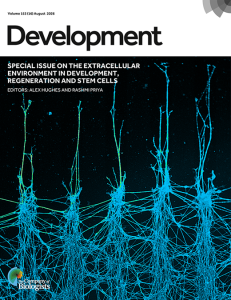
Cover: HNK1-positive enteric neural crest-derived cells (ENCDCs) migrate efficiently on fibronectin-coated stripes, whereas alternating chondroitin sulfate proteoglycan (CSPG)-coated stripes strongly inhibit their migration. This sharp contrast illustrates how extracellular matrix (ECM) composition regulates ENCDC migration and highlights ECM modulation as a potential strategy to improve stem cell-based therapy for Hirschsprung disease. See Research Article by Szőcs et al.

Developmental biology has traditionally been viewed as the study of the activity of genes and cells as functional units. However, cells do not exist in a vacuum, and the contribution of the geometrical, biochemical and mechanical properties of the microenvironment has increasingly been shown to influence, instruct and canalise important features of developmental processes such as cellular differentiation, migration, signalling and morphogenesis. With this special issue, we are pleased to highlight how the extracellular space contributes to development, regeneration and stem cell biology in diverse, interesting and sometimes unexpected ways.

A clear component of the extracellular environment is the extracellular matrix (ECM), a secreted milieu of various proteins, sugars and biominerals. Historically, the ECM has been difficult to study due to a lack of tools and its varied, complex composition of many components with distinct biochemical, mechanical and functional properties. A Spotlight in this issue highlights how developmental biologists studying the apical ECM are on the precipice of a discovery revolution (Heiman and Sundaram, 2026). Indeed, a Research Article from the issue demonstrates recent advances in our knowledge of apical ECM assembly (Belfi et al., 2026). We also see examples of innovations in ECM biology in our Stem Cells and Regeneration section, with Techniques and Resources articles presenting new tools to study ECM dynamics during vertebrate regeneration (Shen et al., 2026), as well as articles that reveal the requirements for ECM components in invertebrate regeneration (Cox et al., 2026).

Additional research papers in this issue demonstrate how ECM directly interacts with cells to regulate processes such as the delamination of epithelial cells (King et al., 2026), migration of the lateral line primordia (Mertens et al., 2026) and primordial germ cells (Tarbashevich et al., 2026), peripheral sensory neuron development (Saito-Diaz et al., 2026) and axonal pathfinding during regeneration (Roy and Hudspeth, 2026). These tissue-level interactions are also evident in plants, showcasing how airspace patterning is achieved in Arabidopsis leaves (Fitzsimons et al., 2026). In addition, the modification and regulation of secreted signals by the extracellular environment also contribute to signal activity and regulate target cell behaviour, either by the regulation of ECM component properties (Oleari et al., 2026; Wu et al., 2026; Szőcs et al., 2026), interactions with other extracellular factors (Moore et al., 2026; Jones et al., 2026), or a combination of these different mechanisms (Muzatko et al., 2026).

The musculoskeletal system is a particularly prominent example of how extracellular matrices contribute to organ function, with the skeleton and tendons rich in extracellular components. We see a similar focus in our published papers, showing how musculoskeletal elements in mammals, zebrafish and sea urchins instruct cell–cell and tissue–tissue interactions for skeletal (Douglas and Ettensohn, 2026; Descoteaux et al., 2026; Ma et al., 2026) and tendon (Steltzer et al., 2026) development, signalling (Umar et al., 2026), homeostasis (Raftery et al., 2026), patterning and even behaviour (Hanzelova et al., 2026).

Beyond the role of the ECM in development and regeneration, the intrinsic properties of tissues and their environment generate forces, mechanical signals and geometric constraints. Several of our review-type articles focus on the roles such biophysical cues play during development. A Primer provides a beginner’s guide to mechanical principles, introducing terminology and key examples of mechanics in development (Cao et al., 2026). Many of these concepts are expanded in dedicated Reviews, such as the biophysics of luminogenesis, which discusses the interplay between lumens, ECM and surrounding tissues (Lee et al., 2026). In addition, the issue highlights how tissue pressure is generated in embryos and the various ways in which compressive forces inform developmental mechanisms, such as differentiation, growth and tissue folding (Tan and Chan, 2026). Unsustainably high pressures cause tissues to break and rupture; another Review highlights that such fractures and fissures are key strategies in developmental morphogenesis (Santos-Oliván et al., 2026). Meanwhile, the role of geometry is expanded upon in a dedicated Review, emphasising that boundaries provide instructive inputs across the development and differentiation of plants and animals, both in vivo and in vitro (Harrison et al., 2026). These mechanical features are emphasised in our research papers, which demonstrate the role of tissue stiffness in regulating cell fate (Corujo-Simon et al., 2026), as well as new tools to measure tissue forces in an in vivo context (Hernandez-Rodriguez et al., 2026).

Together, the articles published in this special issue highlight the variety of ways in which the environment in which cells and tissues grow and develop influences their behaviour. It provides a broad overview of the extracellular environment across cell types, tissues, species and systems, and emphasises the importance of a regulated environment for proper development, regeneration and stem cell differentiation. With the development of new tools, techniques, and approaches, we look forward to the future of the field. We hope you enjoy reading the issue and that it inspires and supports the community as it embraces a holistic approach to understanding how embryos form. Development continues to welcome manuscripts that explore developmental biology from this perspective – we hope to receive your submission soon.

(2 votes)

Tags: , , ,
Categories: News, Research

Embryogenesis: an experiment that went too well

Posted by , on 4 September 2026

How is it possible that cnidarians evolved so many different ways to acomplish the same thing? Unipolar and multipolar ingression, invagination, delamination, epiboly… All the paths lead to ‘planula’ – a torpedo bilayered swiming larva.The term is ‘equifinal development’ and it concerns interspecific and also intraespecific variations, which are quite common among cnidarians and sponges. Meaning that embryos from the same species may gastrulate through different modes depending on mechanical forces that take place and not genetic instructions (Nakanishi et al. 2008; Y. A. Kraus and Markov 2017). Some researchers have been proposing, indeed, that the phylotipic stage works as a stabilization period in development (Richardson, 1998; Duboule, 1994). A convergent force within the embryonic development of each individual. But how this mechanism evolved? Could the pre-bilaterian planula be the first bauplan stabilization program to evolve?

Well, it might as well be the second! The first being the sessile zoophyte stage that came before any embryonic process and made it possible for embryogenesis to evolve as a pre-metamorphic experiment. If we accept Cavallier-Smith’s theory that the first metazoa was a choanoflagelate-like colony that attached to the substrate to become a filtering zoophyte (Cavallier-Smith, 2017), then it becomes natural to conceive embryogenesis emerging at the larval pre-metamorphic period of life and wihtout an imediate impact towards the animals final bauplan (i.e. the zoophyte). Making it an enviroment with low selective pressure.

In the article ‘The arising of embryogenesis from a controlled and experimental window of life‘ that will be published soon, we explore how lecitothrophy plays a major role in provoking the first experiments of cell rearrangement together with the evolution of signaling pathways presenting a great amount of crosstalk. Both of which were crucial for embryogenesis to emerge as a unique modus operandi in nature: Cells that are capable of using qualitative communication systems to transform molecular/mechanical asymetries into rapid morphological chages (i.e. Morhpogenesis!)

Burried as soon as metamorphosis came by, that was the destiny for the processes of morphogenesis that were experimented during the pre-metamorphic perioed of life. Yes, embryogenesis made its debut in a tricky scenario. But being burried by metamorphosis didn’t mean to be lost. Generation after generation, cell communication became more sophisticated and the embryo’s internal world, more complex. A battle was in motion, that is for sure… between embryonic shapes and the zoophyte filtering platform. And eventually embryogenesis would champion! Or did the battle was just transfered elsewhere? Early embryogenesis vs phylotypic stage? Is it possible that the planula stage evolved as a kind of metamorphosis within embryogenesis? What about more complex phylotypic stages? Those are questions for the near future, but one thing is for sure; it is becoming increasingly clearer that embryogenesis is something completely different than the accumulation of evolutive processes.

(2 votes)

Tags: , ,
Categories: Uncategorized

The final stretch that tests every PhD Student 

Posted by , on 4 September 2026

The recent deluge of Substack and Medium articles, promising strategies and frameworks to work effectively and to complete tasks with intentionality, would have some to believe that the ‘P’ in PhD stands for “productivity” and not Philosophy. As if these neatly bound systems are the golden recipe for delivering excellent work. Yet, this perfectly packaged lie is further from the truth than a PhD student claiming their lukewarm cup of coffee is the last one of the day. Nonetheless, these posts are consumed like sweet cakes, because we all want to work harder, do better, and finish stronger.  

Photo by Vitaly Gariev on Unsplash

Being in the final stages of my own PhD, I am also experiencing the unavoidable intense internal pressure to get things done. And get them done fast. But my years of watching Olympic long‑distance runners duke it out on the track have taught me a valuable lesson. 

In long‑distance endurance races, it is not always the athlete who is the fastest or who was leading the race that claims the gold.  The winner, often overlooked or underestimated, is decided in the last 400 to 100 metres of the race. The “finishing kick”, which is a fast sprint to the finish line, is what determines the winner. It is a calculated strategy. Athletes who “kick” too early out of fear of losing or being overtaken lose steam in the final stretches of the race. Athletes who “kick” too late don’t have enough track left to build up the speed and momentum needed to carry them to victory. As a strategy, the perfect “finishing kick” is a useful skill. One that is planned and timed before the race. More importantly, it is also about having grit and resilience. 

PhDs are often described as a marathon (really, it is more like a triathlon if you ask me). And I don’t think it’s your performance during the PhD that shapes you; it’s the final stages. The last 6 to 8 months, is a period consisting of final data analysis and frantically writing up the final thesis chapters. It’s the time where you need to show your iron and ability to get up and push through. To do hard things even when you are tired. To continue and not give up until you have given your last step over the finish line. 

Photo by RUN 4 FFWPU from Pexels: https://www.pexels.com/photo/men-doing-track-and-field-12698192/

This is the hardest stage of the PhD, because everything you have done in the previous two years must now be shaped into a coherent and original piece of scholarship. It is a daunting task, and many have succumbed to performance anxiety, haunted by impostor syndrome that plagues even the academy’s brightest minds. This fear of failing before competition triggers our primal fight-or-flight instinct. Fighting the urge to fail, some PhD students rush towards the finish line and misjudge the distance. Blinded by the pending victory fireworks, their timing and pace are completely off, leading them to lose steam too early. In academia, this translates to burnout, a lack of motivation, and a decline in passion and energy. All of which can delay progress. Fast is not always better. Rushing forward can blind you to the curves and obstacles in the way. All of which can cause you to stumble. Additionally, speeding through your research does not allow you to discover the nuggets of information that could turn a good project into an extraordinary one. On the other hand, some might underestimate the distance to the finish line. While taking it easy and going with the flow can keep you in the race, being unprepared or worse, underprepared, is like not stretching before the race. You participate but eventually will get a cramp or trip over your own feet. And because your bidy and muscles are not warmed up enough, you will not have the power to build up the speed and momentum needed for the last push. If you are like me, an international student, keeping sight of the project timeline and milestones is needed to ensure that the distance to the final viva is not further away than anticipated. Or that you finish the race but with an unsatisfactory performance because you only had enough distance left for a meagre half kick. 

How then do you tackle the PhD “finishing kick”? 

Every PhD student will go through slumps after tough dedicated periods. But comebacks are what is important. The final push will feel hard and can be daunting. But like all athletes, I see the days spent in the lab, reading literature papers, and sifting through stacks of data as sessions where I have silently been building my endurance and stamina. And while the fear of failing still looms over my head, I remind myself that a race does not get finished in one quick go; like a journey of 1000 miles, it takes one step at a time. So, to finish the PhD, my PhD, I am strategically building and preparing for my “finishing kick”.  

It starts by holding myself accountable to do one PhD-thesis-related thing a day. This includes formatting figures, creating a well‑annotated outline, or writing 500 words. As an “academic athlete,” wearing the right running shoes and gear is important. I intentionally make sure that I am equipped for my planned tasks. I’m a little old school and like to write notes and sections out by hand.  I also work best in a quiet space because it helps me to think and connect ideas. 

Finally, the most important point to remember is to “kick” in the right direction. You and I both don’t want to run miles in the wrong direction and not cross the finish line. So stay on the course. This is harder because everything and everyone is vying for attention. But to get things done, I have found that you need to stay in your lane, focused on your mission regardless of how you feel or what others might consider a priority. It is here, in the thick of the final months, that your grit as a PhD student is forged. 

My final advice to current or future PhD students: Don’t let the last push, to finish the PhD, kick you down. Rather, let your “kick” be the push that carries you across the academic victory line. 

(2 votes)

Tags: , , ,
Categories: Discussion, Education, Lab Life

How to use Git/GitHub like a Pro?

Posted by , on 3 September 2026

If you have ever tried to set up Git and GitHub, you have probably run into a wall of cryptic errors. I certainly did when I was setting it up for the first time! So, I thought I will share a quick guide on how to use Git/GitHub for maintaining reproducible analysis.
In this guide, I will break down exactly how Git and GitHub communicate, share some rules for version-controlling bioinformatics projects, and provide step-by-step setups tailored to your specific coding environment: whether you use VS Code, RStudio, a pure Bash terminal, or Jupyter Notebooks.


The Mental Model
The biggest hurdle in learning version control is understanding that tracking a file locally does not automatically upload it to GitHub. Git operates in distinct phases:
The Local Time Machine (.git): When you initialize Git in a folder, it creates a hidden .git database. It does not auto-save every keystroke. Instead, you have to tell it to take a “snapshot” of your project at a specific moment. This is called a Commit. Your local Git works 100% offline.
The Cloud Backup (GitHub): GitHub is just a server running the same Git software. To get your local snapshots onto GitHub, you have to explicitly Push them.

Golden Rules for Bioinformatics
Before we touch any commands, here are the non-negotiable rules I follow to keep my repositories clean and reproducible:
Never commit raw data: GitHub has strict file size limits and is meant for code, not data. Create a .gitignore file in your main folder and add extensions like *.bam, *.vcf, *.fastq, and *.csv.
Track your environment, not just your code: Code rot is real. A script that runs today might break next year due to package updates. I use Pixi, so I always export my environment and commit it alongside my scripts.
Commit logically: Commit when you finish a specific task (e.g., Add data parsing function), not just at the end of the day.

The Setup Guides
How you implement Git depends entirely on where you write your code.


Scenario A: Visual Studio Code

VS Code has a fantastic visual Git interface, but linking an existing GitHub repository for the first time usually triggers a cascade of errors. Here is how I set it up flawlessly.
1. The Initial Link & First Push
If you created a repository on GitHub first and want to push your local VS Code files to it, open your integrated terminal and run:
git remote add origin https://github.com/yourusername/your-repo-name.git git branch -M main git push -u origin main
2. Handling the “Non-Fast-Forward” Error
If GitHub rejects your push because the repository already has a README.md or License file that your computer doesn’t have, force the local code to overwrite the remote:
git push -u origin main --force
3. Handling the “GH007: Private Email” Error
If GitHub blocks your push to protect your email privacy, get your anonymous GitHub email from your settings (12345678+username@users.noreply.github.com) and update your Git config:
git config --global user.email "your-anonymous-email@users.noreply.github.com" git commit --amend --reset-author --no-edit git push origin main --force
4. The Daily VS Code Routine
Once the setup is done, I don’t have to touch the terminal for Git again. At the end of the day:
Open the Source Control panel.
Click the + to stage changed files.
Type a message and click Commit.
Click the blue Sync Changes button.
(Pro tip: Allow VS Code to periodically run git fetch. It safely checks GitHub for updates in the background without altering your local files.)


Scenario B: The Bash Terminal
If you are working via SSH on an HPC cluster, you won’t have a graphical interface. You have to rely purely on Bash commands.
1. The Initial Setup
Navigate to your project directory and run:
git init git add . git commit -m "Initial commit" git branch -M main git remote add origin https://github.com/yourusername/your-repo-name.git git push -u origin main
2. The Daily Terminal Routine
After a day of coding, my sync routine looks like this:
git add script_name.py environment.yml git commit -m "Update" git push origin main


Scenario C: RStudio
RStudio has Git integration baked directly into its GUI, which is perfect for ggplot2 and dplyr workflows.
1. The Initial Setup
Go to Tools > Global Options > Git/SVN. Ensure the path to your Git executable is set.
To start a new project, go to File > New Project > Version Control > Git.
Paste your GitHub repository URL. RStudio will clone it and set up the working directory automatically.
2. The Daily RStudio Routine
Look at the top right pane in RStudio; you will see a Git tab.
Check the boxes next to the .R scripts you modified (this is Staging).
Click Commit, type your message in the pop-up window, and save.
Click the Push (Up Arrow) button in the Git pane to send it to GitHub.


Scenario D: Jupyter Notebooks
Jupyter Notebooks (.ipynb files) are notorious in the Git world. Under the hood, they are messy JSON files that store not just your Python/R code, but also the visual outputs, plots, and execution counts. If you commit a notebook with its outputs, your GitHub history becomes an unreadable mess.
1. The Best Practice Setup
I treat Jupyter Notebooks as temporary scratchpads. If I absolutely must version control a notebook, I always clear the outputs before committing.
In Jupyter, click Cell > All Output > Clear.
Save the notebook.
2. The Sync Routine
Jupyter itself does not have native, robust Git tools built into the default interface. I always run a Bash terminal window alongside my Jupyter server, or I open the folder in VS Code, and use the terminal/VS Code routines mentioned in Scenarios A and B to stage and push the cleaned .ipynb files.

Version control has a steep learning curve, but once that initial pipeline is connected, it becomes invisible. Set up your .gitignore, lock your environments, and stick to the daily staging and syncing routine. Your future self will thank you!

(1 votes)

Tags: , , ,
Categories: Resources

ULT1 and me

Posted by , on 3 September 2026

“I have often thought how much more interesting science would be if those who created it told how it really happened, rather than reported it logically and impersonally, as they so often do in scientific papers.”

This was the opening paragraph of an essay written by George Beadle, a geneticist, and it was included in a book made for the 60th birthday of biophysicist Max Delbrück1.

I agree with George Beadle, and in this brief article, I would like to share my perspective on the story presented in our recent paper, about how a protein influences Arabidopsis development 2.

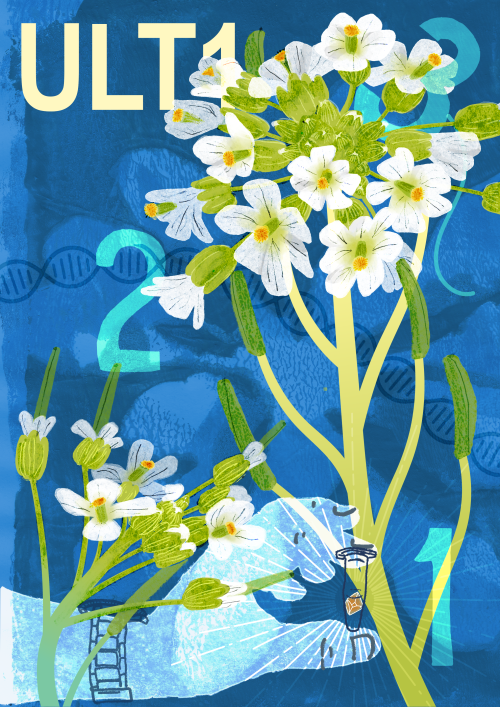
“ULT1 and me” artwork by Dr Hsuan Pai

Following three guiding questions

Originally, ULTRAPETALA1 (ULT1) was identified in a forward genetic screen3. Steve Jacobsen, now a professor at UCLA, once told me that he might have been the first person to see its flowers almost thirty years ago. Jennifer Fletcher, researcher at UC Berkeley, was the first to characterize the mutation in detail3. As the name ULTRAPETALA indicates, plants carrying a mutation in this gene produce many more petals than wild type flowers. Fittingly, the first paper on ULT1, along with several ones following it, were published in Development3–5.

I entered the story 20 years later.

I first came across ULT1 during one of my Master’s internships, as I was doing biochemistry experiments to try and get the protein’s structure. I managed to purify and obtain crystals of part of the protein in the days before AlphaFold, and during the Covid pandemic, when it was difficult to even enter the lab. To this day, it was one of the luckiest experiments I have ever done – it worked on the very first try6.

I continued working on ULT1 over the next three years, trying to figure out how the protein works. As a student in (plant) development, I loosely followed Sydney Brenner’s three guiding questions:

  • How does it get built?
  • How does it work?
  • And how does it get that way?

These questions ultimately relate to physiology, development and evolution.

As far as physiology goes, we knew a lot about flowering time and flower development, but the role of ULT1 in these processes remained quite mysterious.

It was also unclear how ULT1 works. For a long time, it was thought to activate genes, and much of the evidence seemed to point in that direction7. Overexpression of ULT1 produced a phenotype resembling loss of Polycomb function. Polycomb is a highly conserved protein complex with a well-established role in gene repression, so the interpretation seemed straightforward: too much ULT1 is like too little Polycomb.

But mutant phenotypes told a less clear-cut story. ULT1 mutants flower later than wild type Arabidopsis plants, a phenotype attributed to an increased accumulation of Flowering Locus C (FLC), the central repressor of flowering8. The extra petals are linked to an overaccumulation of WUSCHEL (WUS), a protein important for the maintenance of the stem cell niche in plants9,10. These phenotypes indicate that ULT1 may repress genes such as FLC and WUS, rather than activate them.

Genetics can be very confusing and sometimes misleading.

After a lot of biochemistry, some microscopy, bioinformatics, and more genetics, we finally nailed it down. We described, with some very nice experiments (definitely a non-biased opinion), that ULT1 directly interacts with and stimulates Polycomb activity. Importantly, this means that ULT1 has a repressive function after all.

The paper is now published in Nature Plants2 and has an associated News and Views article11. I’m also pleased that the work has received some public attention: the article was featured in the science section of Le Monde, one of the world’s leading newspapers12.

Many loose ends remain

We managed to answer the first two questions, about physiology and development.

I never managed to answer the third question, about the evolution of ULT1, which might be the most interesting one.

ULT1 is a plant-specific protein, while Polycomb is conserved across eukaryotes. That raises a deceptively simple question: why is ULT1 only found in plants?

What would happen if we put ULT1 into animal cells? Would it interact with the mammalian Polycomb machinery? Would it alter Polycomb activity or targeting?

And could we engineer artificial ULT1-like proteins that modulate or redirect Polycomb activity, perhaps one day providing new ways to intervene in diseases in which Polycomb function is disrupted, such as in many cancers?

I would love to find out.

But I’m onto something new now, so I’ll leave these questions to the next researcher. Good luck!

This article was written by Dr Vangeli Geshkovski and edited by Dr Laura Turchi

References:

1.         Cairns, J., Stent, G. S. & Watson, J. D. Phage and the Origins of Molecular Biology. J. Hist. Biol. 1, 155–161 (1968).

2.         Geshkovski, V. et al. The dual trxG/PcG protein ULTRAPETALA1 modulates H3K27me3 and directly enhances POLYCOMB REPRESSIVE COMPLEX 2 activity for fine-tuned reproductive transitions. Nat. Plants 12, 1561–1578 (2026).

3.         Fletcher, J. C. The ULTRAPETALA gene controls shoot and floral meristem size in Arabidopsis. Development 128, 1323–1333 (2001).

4.         Carles, C. C., Choffnes-Inada, D., Reville, K., Lertpiriyapong, K. & Fletcher, J. C. ULTRAPETALA1 encodes a SAND domain putative transcriptional regulator that controls shoot and floral meristem activity in Arabidopsis. Development 132, 897–911 (2005).

5.         Moreau, F. et al. The Myb-domain protein ULTRAPETALA1 INTERACTING FACTOR 1 controls floral meristem activities in Arabidopsis. Development 143, 1108–1119 (2016).

6.         Foucher, A.-E. et al. ULTRAPETALA1 remodels PRC2 recruitment to nucleosomes. 2026.06.16.732580 Preprint at https://doi.org/10.64898/2026.06.16.732580 (2026).

7.         Carles, C. C. & Fletcher, J. C. The SAND domain protein ULTRAPETALA1 acts as a trithorax group factor to regulate cell fate in plants. Genes Dev. 23, 2723–2728 (2009).

8.         Whittaker, C. & Dean, C. The FLC Locus: A Platform for Discoveries in Epigenetics and Adaptation. Annu. Rev. Cell Dev. Biol. 33, 555–575 (2017).

9.         Somssich, M., Je, B. I., Simon, R. & Jackson, D. CLAVATA-WUSCHEL signaling in the shoot meristem. Development 143, 3238–3248 (2016).

10.       Laux, T., Mayer, K. F. X., Berger, J. & Jürgens, G. The WUSCHEL gene is required for shoot and floral meristem integrity in Arabidopsis. Development 122, 87–96 (1996).

11.       Velanis, C. N. ULTRA(PETALA)-boosted plant Polycomb. Nat. Plants 12, 1428–1429 (2026).

12.       Jacquin, J.-B. Le ballet épigénétique derrière la floraison des plantes mis au jour.

(117 votes)

Tags: , , , , , ,
Categories: Outreach, Research, Uncategorized

Bytes don’t lie: How a hidden space broke my single-cell pipeline

Posted by , on 3 September 2026

If you are a bioinformatician, you have probably come across this situation. You’re deep into a single-cell RNA sequencing analysis, preparing your object for downstream analysis. All that’s left is a simple metadata merge to bring in your clinical annotations. You run the join, check the output, and everything looks perfect, except for one stubborn sample that refuses to annotate. It just sits there, mocking you with an NA where its clinical annotation should have been.

Today I will share the story of how a single, invisible character derailed my pipeline, how standard data cleaning tools missed it, and how looking at raw machine bytes finally solved the mystery.

The Havoc

I was trying to map clinical annotation to a Seurat object. The logic was straightforward: take a CSV of patient data and merge it into the single-cell metadata using the patient_id column as the key.

Out of dozens of samples, only one failed to map. Without this metadata, I couldn’t run differential expression for this patient or cluster the cells properly.

I checked the source CSV; the subtype was clearly documented. I checked the Seurat object; the cells for that patient were definitely there. I printed both IDs to the console. They looked identical: Sample_X in the object, Sample_X in the CSV. So why was R treating them as completely different entities?

The False Starts

In bioinformatics, messy data is unfortunately the rule, not the exception. I immediately assumed there was a hidden space or a weird formatting artifact. To fix it, I threw standard dplyr cleaning functions at the metadata, targeting all character columns to strip out rogue whitespace:

library(dplyr)

seurat_obj@meta.data <- seurat_obj@meta.data %>% 
  mutate(across(where(is.character), trimws))

I re-ran the merge. Still NA.

I thought maybe the merge function itself was scrambling the row names (a classic Seurat trap), so I switched to vector mapping using match(). I deleted the row in the CSV and re-typed it manually, thinking there was a hidden carriage return. I wiped my R environment and reloaded everything from scratch.

Nothing worked. I was losing my mind over a seemingly perfect string.

The Breakthrough Investigation

It was then that I came across a post that mentioned to stop looking at the strings as text and start looking at the underlying memory. If the console was lying to my eyes, I needed to see exactly how R was storing that specific string in memory.

I extracted the exact problematic patient_id from the Seurat object and passed it to charToRaw(), which converts a string to its raw hexadecimal bytes.

# Extract the problematic ID and inspect the bytes
problem_id <- unique(seurat_obj@meta.data$patient_id[grepl("Sample_X", seurat_obj@meta.data$patient_id)])

print(charToRaw(as.character(problem_id)))

The output hit the console:
53 61 6d 70 6c 65 5f 58 20

There it was. That trailing 20 at the very end of the hex sequence. In ASCII, hex 20 is a standard space. The Seurat object held Sample_X, while the CSV held Sample_X.

The Factor Trap

But wait, if it was a standard space, why did my trimws() command completely miss it earlier?

Then it clicked to me. I looked at the structure of my data frame. During the initial object creation, the patient_id column had been automatically coerced into a factor, not a character string.

My cleaning code specifically commanded dplyr to target where(is.character). Because factors are stored as integers with assigned string labels under the hood, dplyr skipped the column entirely. The space was safely protected inside the factor level, silently breaking the exact match required for the merge.

I coerced the patient_id column back to a character and then ran the trimws step. The merge finally worked.

The Permanent Fix

While the R fix worked, patching bad data downstream is a dangerous game. The original annotation CSV actually had the trailing space in it, and I wanted to kill the problem at the root.

Before the data ever touches R, I now run a quick bash script using awk to sanitize the raw CSV, stripping leading and trailing spaces from every single cell:

awk -F',' -v OFS=',' '{ for(i=1; i<=NF; i++) gsub(/^[ \t]+|[ \t]+$/, "", $i); print }' raw_annotations.csv > clean_annotations.csv

The Takeaway

Being a bioinformatician is often 10% biology and 90% acting as Sherlock Holmes for formatting inconsistencies.

This entire incident reminded me why defensive programming is non-negotiable. Packages like janitor are incredibly popular for a reason; functions like janitor::clean_names() will sanitize your column headers beautifully. But as this bug proved, you also have to be paranoid about your row values and data types.

Never assume a column is a character just because it looks like text. Trust nothing, verify your variable types, and when strings refuse to match, look at the bytes.

Because bytes don’t lie.

(1 votes)

Tags: , , , , ,
Categories: Resources